If you’ve got a podcast, you probably want more listeners, right?
Growing your podcast’s listener base, getting more subscribers and increasing those downloads are key metrics that can be worth obsessing over. You pour so much time, effort and money into researching, recording, editing and promoting your podcast, you want your loyal listeners to love it too.
And I’ll bet you’d also like to make some money for all the hard work you put into your podcast too, alongside attracting and keeping those listeners.
So, we need to talk about monetisation, and in podcast land, that either means contributions from your audience (like tips, subscriptions, merch, products and memberships) and/or contributions from brands that want to get in front of your audience (like ads, sponsorships and partnerships).
A bigger audience for your podcast means more potential money to be made, so you wanna get more people finding your podcast – you need a podcast website, and you need people to be able to find that website. But how?
Podcasters are sitting on a wealth of SEO gold that is sorely under-utilised… and there’s where out topic of today comes in – episode show notes, my friend!
We’re going to break it down for you step by step, making it super easy for you to optimise your show notes and improve your podcast website’s SEO, in order to get your podcast in front of more people.
(If you’re after more general podcast website advice, our blog post 10 expert tips for designing a podcast website will be exactly whatcha want.)
First up: podcast SEO vs website SEO for your podcast website
Search engine optimisation (SEO) is the process of optimising something with the goal of appearing more highly and more often in search results delivered by search engines to their users’ queries.
Most of the time, when people are chatting about SEO, the something is your website, and that search engine is Google.
However it’s not the only search engine – we all use search engines all the time, like the search bar in clothing websites, your email inbox, on Instagram, and of course, podcast players like Spotify and Apple Podcasts.
So podcast SEO sometimes refers to optimising your show and episode content to appear for the search engines built in to those podcast players, and sometimes it refers to your podcast website.
In this article, we’re talking about the Google sort of SEO – the stuff that will help your podcast website rank higher – because we know lots about website SEO, but we don’t know the intricacies of Spotify or Apple Podcast search engines (and the like).
Let’s go.
1. Minimise content duplication between your podcast website and other websites
This is just like when we tell our ecommerce clients to make sure they don’t use the same product descriptions on Etsy and their own website – if Google has two copies of the same thing, it’s incredibly unlikely to share both in its search results.
What usually happens is that the version on the bigger & better website ranks well, and the version is the SEO-equivalent of in the bin.
So if you’re using the exact same podcast episode show notes on Apple and Spotify, they will likely appear top in search results, and rather than your website ranking second, it would be more likely that your podcast website’s episode pages won’t rank at all.
When writing your show notes, we recommend having the best copy of it on your own website, and then to use a shorter version of it elsewhere (on Spotify, Apple Podcasts, your podcast distributer, etc.).
You also want to minimise duplication between each episode, and make sure each one has as many unique elements to it as possible.
This is so that Google – and the humans on your website too – can tell the difference between your interview with Sally Beanstalk and your chat with Mary Legumes (can you tell that was an Aime example? She’s so good at coming up with fake names).
And don’t worry your lil head about how you’re gonna get all that info into each page – we’re about to tell you how to write the best, most unique episode show notes on your podcast website.
2. Increase the word count on your podcast episode pages
Studio Cotton founder Aime often recommends that 80% of blog posts should be over 950 words, because whilst Google makes it very clear that they don’t rank pages higher based on word count, we also know there are plenty of stats out there that show that the toppest-top search results tend to be dominated by longer articles.
Backlinko recently analysed 11.8million Google searches, and found that “the average Google first page result contains 1,447 words,” while Monster Insights says it’s 1890.
Longform content is great for SEO, because all those lovely words give Google more context for what your website is about. Having lots of pages on a website is also great for SEO, so making an individual page or blog article for each episode could result in your podcast website winning loads of traffic that you can then turn into listeners.
That doesn’t mean you should pad out your episode show notes for the sake of it, but if you do increase your word count with relevant info and a healthy amount of keywords, there’s a good chance that you’re more likely to rank better than a podcaster who writes really short show notes.
Below you’ll find our favourite tips for writing podcast episode show notes that aren’t just full of waffle.
3. Divide your episode show notes into clear sections with H2 subheadings
Google uses content hierarchy to better understand each page on your website. Your website headings sit right at the top of that content hierarchy, and they’re kinda like your way of telling Google “hey, this is the most important stuff on this page”.
Subheadings are something that we don’t see in a lot of podcast show notes, but it’s likely because Apple Podcasts and Spotify don’t let you put them in. However, if you have a podcast website, you have so much more control over your content structure.
The title of your episode should be a H1 (Heading 1), as it’s the most important, and should accurately describe the content of the episode. There should only ever be one H1 per page.
Using subheadings (H2s) is the easiest way to give your content some structure and really help Google to understand it, especially if you make those H2s really specific, with some yummy relevant keywords.
Aime perfectly breaks down the keywords you need in this Instagram post – it’s easy to get bogged down in wondering what the best keywords are for your small business or your podcast, but the most important thing is to be specific, and to write headings that only apply to your content and your episodes.
4. Pull out a handful of key points from your podcast episode
Pulling key points out of each podcast episode is great, because it increases the difference between episodes. But instead of having a list of bullet points, we recommend picking 3 to 5 key points, and putting each one under an H2 – that way you’ve got more of those unique subheadings.
It could be some insightful quotes from your interview guest, the different locations mentioned if you’ve got a true crime podcast, or a list of historical events mentioned in a history podcast.
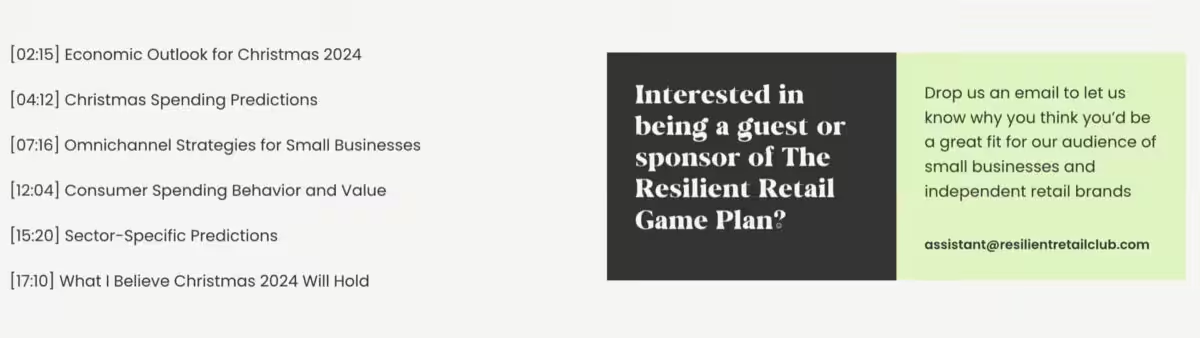
Catherine Erdly of The Resilient Retail Game Plan podcast does this, as you can see in the screen-grab below, which is from her Christmas-related episode, 2024 Christmas Unwrapped: Insights for Retailers.
She identified important sections of the podcast episode and listed them with timestamps, and then added H2s for these in the transcript, making it nice and easy for listeners to find what they need, and it’s good for Google too.

5. Include a list of episode resources (and hyperlink them)
If you or your guest(s) mention a book, a website, or any other helpful resources, add it to your episode show notes, and make sure to include a link, otherwise your audience will have to leave your podcast website to find it themselves, and might not come back…
Relevant links in (backlinks) and out of your podcast website are great for SEO, because these digital connections built between websites gives Google more context for what a website is about – for example, if you link to a Bristol-based indie restaurant in your episode show notes, it’ll tell Google that your podcast website is related to food and Bristol.
I pretty much explained it there, but Aime also made a very helpful Instagram post about outbound links, if you are a more of a visual learner.
As with some of our previous points, this is not just about SEO, but about being helpful, however, helpful is a quality that Google looks for and ranks higher.
An episode resource list gives you a way to keep people engaged with your content, and gives people a reason to keep coming back to your website – return visits are also a ranking factor, so that’s nice.
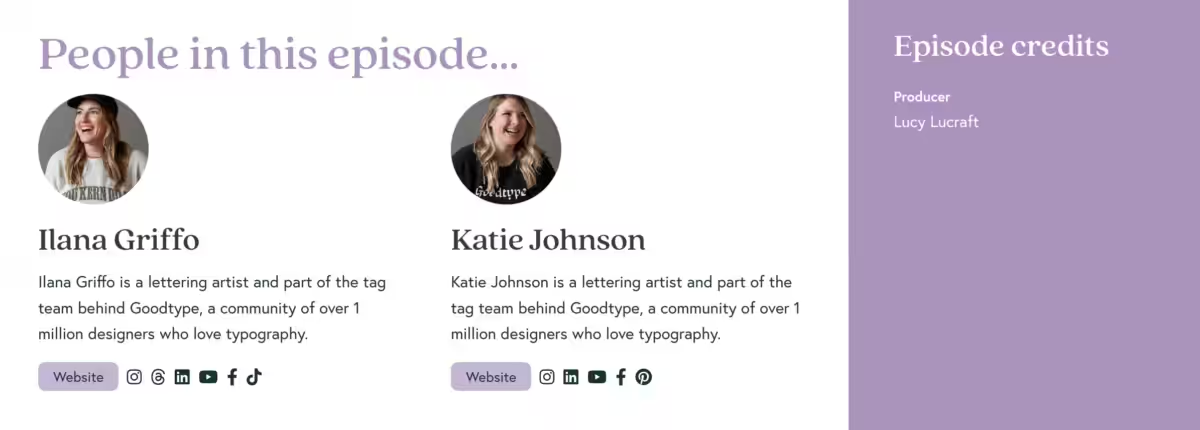
On the Building Your Brand podcast website (which we built 😎) there’s a nifty section for episode resources, seen in this screen-grab from the Inheriting 1 Million Followers with Ilana & Katie from Goodtype episode, making it super easy for people to find.

6. Add an ‘about the guest’ section (and pop their name in the subheading)
If you interview people on your podcast, make sure that you have a clear section about your podcast guests, also under an H2, and – bonus thing – make sure their name is in the heading.
This is called SEO piggybacking, and is a neat (and cheeky-ish) technique that has reliably good results – Aime has written about SEO piggybacking in this post on Instagram, where she explains how I wrote a blog post about our favourite coffee shops for meetings in Bristol, which has now has 90k impressions, even though we’re not a café.
We rank highly for that popular search term, and you could rank highly for your guest’s name.
7. Hand-pick related podcast episodes
The reason we want to hand-pick related podcast episodes is because, although it’d be good to have them related by category or related by topic, a lot of websites don’t make that particularly easy.
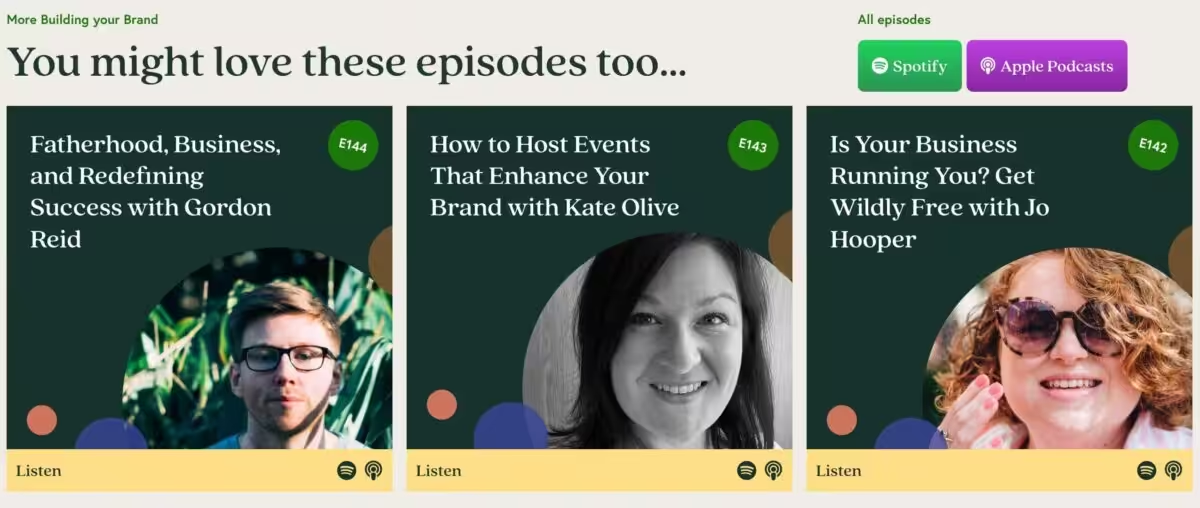
If you hand-pick related podcast episodes, you can just write it in the text and hyperlink them to your other episode pages, or you can have fancy thumbnail buttons, like in the Building Your Brand podcast episode show notes below.
And, if you hand pick episodes, it gives you control over what you genuinely think someone else would like to listen to – they could just be the episode before and the episode after, but you know your podcast content better than anyone, so there might be a specific episode that relates to this one that would be helpful for your listeners to head to next.
8. Ask yourself “does this page answer more than one Google search without listening to the episode?”
If your episode pages on your podcast website don’t do anything apart from play an audio file – not that there’s anything wrong with that, but it’s unlikely that that’s what someone wants to find when they are searching for something on Google.
Your episode page has to work in isolation if you want it to be an answer to a search engine query – it has to do something or answer a question that someone has.
We’re not saying that should be the main goal of an episode page, but when you finish writing your show notes be like, “OK, if I had a searched on Google for ‘Mary Legumes’ and I saw these show notes on this podcast episode page, is something that’s, like, really useful?”
9. Here’s a sample podcast episode show note structure
If all of that is feeling a bit jumbled up in your head, here’s how we’d like your podcast episode show notes to look:
- Introduction.
- H2: about this episode
- A few sentences about the episode
- H2: [key point]
- A few sentences about the first key point
- H2: [key point]
- A few sentences about the second key point
- H2: [key point]
- A few sentences about the third key point
- H2: episode resources
- A list with some helpful outbound links
- H2: about [guest name(s)]
- A few sentences about guest(s)
- H2: listen to this next
- Links to related episodes
It’s easy-peasy really, if a little time consuming, but you can follow this formula every time until it becomes second nature.
Phew, sounds like you’ve got some work to do, but if you have time, check out the podcasting section of the Studio Cotton blog for more helpful articles like 10 expert tips for designing a podcast website, and more about podcast website SEO, Q&As with podcasters, and even how to pitch yourself as a guest on your favourite podcast.