
Howdy partner. In November 2024 I started writing another entry in my Website tips for… blog series, where I dive into overly specific website advice & guidance for different industries and business types.
And in January 2025, I hit publish – but only with the first half of my 18 expert tips for optimising a professional blog website. As it turns out, the number one tip about blogging *I* need is to stop ruddy writing so much and remember how to edit.
Well, instead let’s get into part two because that’s what you’re here for.
10. Reconsider the blog sidebar
Blog sidebars?! What year is this, 2008? More like two-thousand-and-late amirite.
Anyway, blog sidebars are those lil panels that sit down the side of your blog article template page. They used to be a staple of every blog, since like the invention of blogging.
And then, they fell massively out of favour.
Whilst blog sidebars never fully disappeared, they certainly dropped massively in popularity. So much so that many website builder platforms don’t even include sidebars in their default blog templates.
The most common reasoning behind a sidebar-less blog was that it would remove a distraction, encouraging the reader to stay engaged with the content of the article.
Now I totally get this, but to flip the coin over – every reader will have a limit of how much of your article they will read. We will all love for that limit to come at the very end of an article, but for some they’ll tune out like 15, 32, or 73% of the way down the page.
Then what?
A sidebar gives that wayward reader more options to stay engaged with your brand and stick on your website, even if they’re not engaged with that individual article.
Ok, now I’m thinking I need to write a whole other article on blog sidebars – if I’ve done that already you’ll see a link right here ↓
(I totes haven’t written that yet, sorry)
11. Drop in a self-promotional (or brand promotional) blog ad
Ya know when you’re scrolling through an article on like, any major publication, and an ad comes within the body of the text? Here’s a real-life example, kinda.
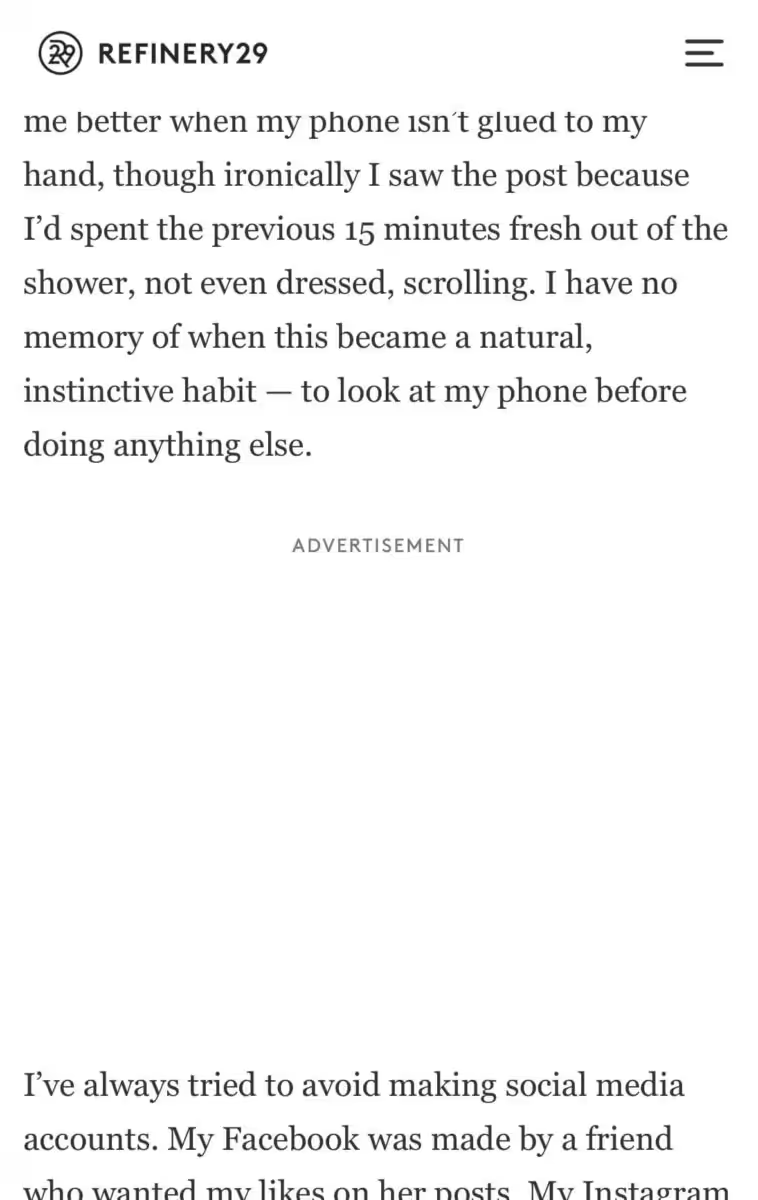
These ads tend to get high engagement levels because they interrupt the reader’s direct eyeline as they read. A lot of professional bloggers have a goal of one-day also offering in-article blog ads, but until then – just make them yourself, and you can promote your own services or products too.
Hold on a sec, because I’m gonna do it riiigggghhhhhtttttt now.
Woah check that out. Self-promo and manually created in-blog ads aren’t a revelation, but they are hugely beneficial to professionals bloggers and business blogs – yet they’re rarely used.
They’re actually a signature feature of our blog package for web design projects, because they can be so dang powerful.
In general, blogs are bad at selling. Readers do not generally like getting through a 1,200 word essay to find out that the answer to their original questions was “NOW YOU HAVE TO BUY MY PRODUCT”. It can make them feel tricked or like their time was wasted, and we never want to leave our readers with a negative sentiment.
In-blog ads get around this by taking the ad out of the actual contents of the article, and self-containing it in its own little ignorable ad zone.
What’s more, these are pretty easy to create in pretty much any website building. Like with Squarespace, you can totally just use the image block with the side-by-side layout. Just remember to still declare that it is ad content.
Bonus thing: at Studio Cotton we build these using dynamic templates, which is a fancy way of saying that our clients can roll out different ads to different articles in just a couple of clicks – mega handy for launches or new brand partnerships 😎
Oh, and you can totally sell this space to brands too. These kinda ads could work better for independent brands and small businesses that are focused on their collaboration with you specifically, rather than a faceless ad network.
12. Build an email sign-up into your blog conclusion
You probably already know that the vast majority of blog articles are most read by people who have never interacted with that blogger or brand before.
I’ve just quickly run the stats on this very website, filtering our visitors by everyone who started their journey on a blog post. Over one period, we received:
- 33,239 users who were new to our website
- 2,462 users who returned, having had visited previously
Now I will admit that I have been utterly shocking at my email marketing over that same period, but I’ve regularly shared articles to my 17k+ followers on Instagram, as well as our brand LinkedIn page, a relative active Pinterest profile, and a thousand peeps on Facebook too.
And yet, 93% of blog landers were brand new to me and my business.
So what’s this got to do with email sign-ups? It’s one of the smallest possible positive steps those newbies can take to making some sort of long-term engagement with Studio Cotton.
Like I said before, blogs are generally not great sales tools – but they are EPIC reach and engagement tools.
If your latest brand new visitor likes what they’ve read, and wants a lil more – getting them on your mailing list in an incredibly compelling call to action. So try building that sign up form into the end of your blog article template.
And yep, sometimes a 10% off or free digital download will increase sign-up rates, but it’s not obligatory – sometimes your great blog content will have already done the convincing for your new fan.
13. Hand-pick your related blog articles
We wanna keep your readers on your blog. We want them to read, click, engage, subscribe, and really draw out the time they spend with us.
Having related articles at the bottom of your blog posts is an easy way to extend a visit and earn that second or third click from your reader.
However, sometimes the auto-selected articles – usually from a shared category or tag – aren’t necessarily the best next step based on what someone has just read.
As well as dotting links to other articles through your work, I always like to include one or two suggested next reading in my blog conclusions.
And if you’re feeling fancy, it might be worth replacing that automated article feed with a visual, hand-selected curation collection.
14. Add internal links from old articles to new articles
Literally as I am writing this post right here, my content producer and professional blogger/content creator Lyzi is working on another article that covers how to optimise your blogging back-catalogue for SEO.
And, when she’s done, I’ll pop a link to that fella right here, too ↓
10 clever ways to improve the SEO of your old blog articles
I couldn’t leave this mega SEO-boosting tip out of this article though, because it’s just so darn powerful and important.
Both Google and your readers like it when your blog posts link to other blog posts. It’s helpful, and adds context to each page. Like if I throw in this link to 10 ways to make small business blog content more subjective, it’ll help Google to understand that both of these articles are about the same topic, and that topic is blogging.
However, if you’re like me, you’re ruddy TERRIBLE at going back to your old articles and linking to those that you’ve published more recently – even though it doesn’t take that long and has huge benefits.
So like right now, open your website in another tab and go link shoehorning. NOW.
Actually, not now – please keep reading my post first. Please.
15. Optimise your blogging back catalogue like a shop optimises its products
Ok I probs should’ve popped this blogging tip above number 14 because again it’s what Lyzi is writing about in way more detail. But.
Your blogging back catalogue is ludicrously valuable for SEO and engagement. Even your seasonal and trend-based articles about Christmas 2022 or lockdown activities for teens can help you to rank higher and more often.
So I want you to use the exact same monthly housekeeping optimisation plan that we use for our ecommerce clients’ products, and each month review & tweak:
- 5 most recent articles
- 5 most-read (bestselling) articles
- 5 articles that are coming back into season
- 5 underperforming articles
As for what to tweak? Well, that’s in Lyzi’s article which I will totes pop here soon. Any day now.
16. Sell your services
A lot of bloggers will offer services in addition to their ad and monetised content. From interior design to copywriting to coaching to craft tutorage to consulting – you might have built up a lovely audience of people who could do with your professional expertise and support.
You might have a lil line on your contact page that says something like “Get in touch for one-to-one services”.
And that’s fine. But it’s not selling your services, it’s not even making them easy to find.
Instead, create a service page – just like the ones we have on our website to promote our web design service. They can sit in your website footer if you like, out the way of your blog content, but flesh it out in a way that makes it clear what you offer.
My trick is to make sure the page covers the what, why, where, how, who and when of your service. This will make is way easier to buy from you, and allows you rank in Google searches for that service too.
17. Create a page for brands, partners & sponsorship
For 9 years I’ve been working with small and independent businesses, and recommending that they work with bloggers to increase their brand reach, reputation, assets, and SEO.
I big you up relentlessly. Relentlessly.
However, y’all do not make it easy.
I can’t even count how many time I have heard from business owners who say, “I really want to do this, but…
- …I have no idea how it works”
- …I have no idea what I’d need to budget”
- …I probably can’t afford it”
- …I have no idea if they’d review a product like mine”
- …I’m worried I’d insult someone with an offer”
- …I’d be so embarrassed if I pitched something they’d never want”
- …I doubt they’d even work a brand as small as mine”
- …I’d want to know what results someone like me could get”
- …I’m not sure if they do collabs in blogs or if it’s just Instagram”
And all of these unknowns and concerns result in businesses with a range of budgets who are GAGGING to collab literally never sending that email or DM.
But here’s the tea.
Did I use that right? I’m nearly forty so my lingo is still stuck in the lollercoaster era.
All of these questions could be answered with a single page on a blogger’s website, making it SO. DANG. EASY. for these small brands – and bigger brands – to give you lovely oodles of tenners in exchange for your content creation.
Now if you want an epic example of how to do this right, I’ve got you. Check out the Sponsor the Podcast page on Building your Brand, a website I designed and built for the epically wonderful graphic & brand designer, Liz Mosley.
This page has key stats, previous collaborators, suitable sponsors info, work samples, packages, and even a shoutout to special rates for independent & small businesses. It’s like a media pack but way way way more accessible and informative.
18. Add evergreen and seasonal monetised pages
Last May, we took our podcast website design services to The Podcast Show in London (here’s a review from that wordsmith, Lyzi), and this tip was all the rage for podcasts who wanna monetise the hoots out of their opinions and recommendations.
Monetised rundowns, shopping lists, discounts, and recommendations – basically publishing long-life pages that use affiliate links and codes to turn your audience into shoppers.
Again, this isn’t a novel or groundbreaking idea, but it’s another blog website feature that can be a neglected priority.
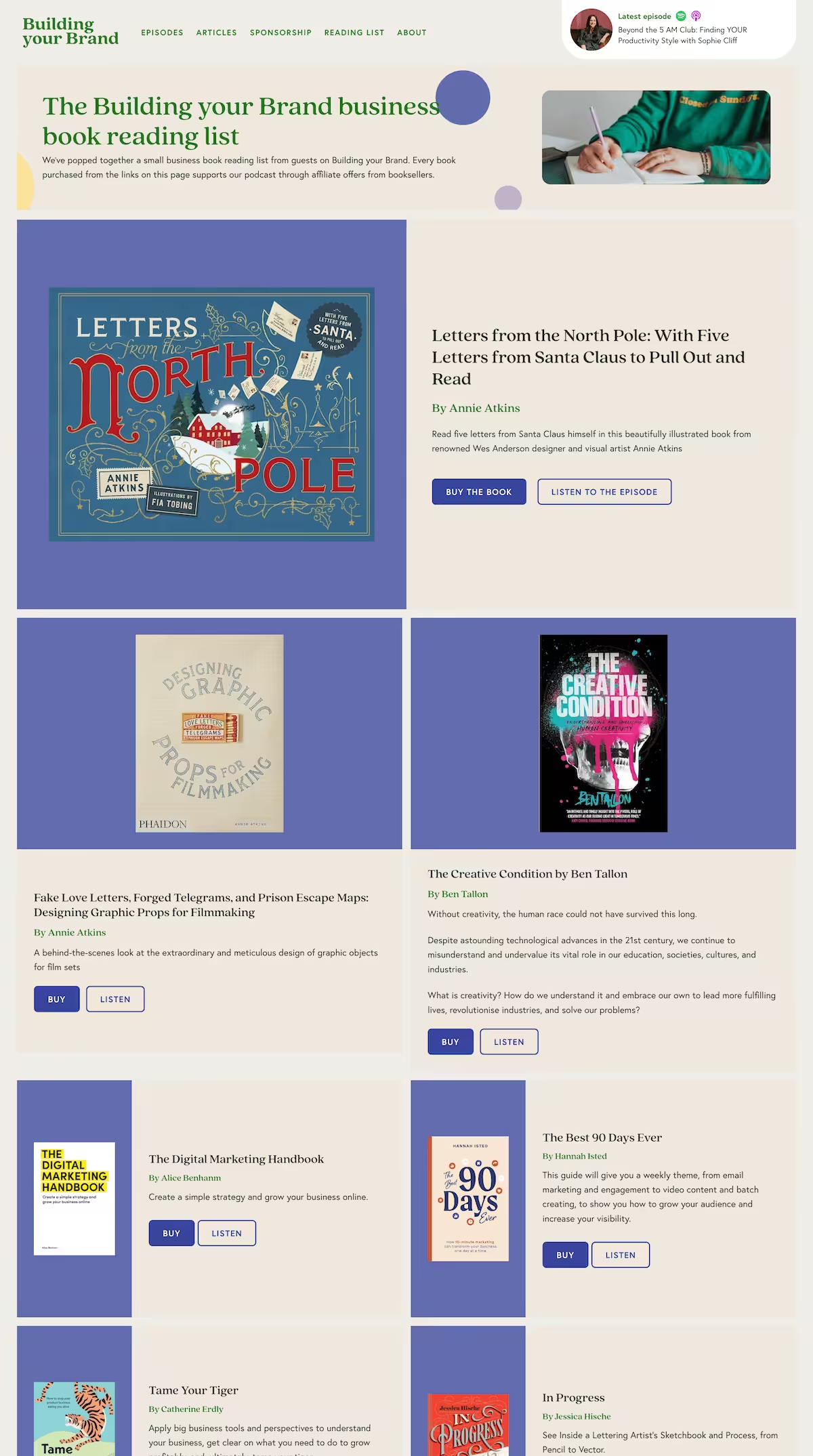
Here’s some ideas that might get you started:
- Reading lists on different topics or for seasons/holidays
- Products that you have in your home/business
- Gift lists for different interests and styles
- Shop my wardrobe
- Your favourite shops and brands
And if you don’t have an affiliate link set up, these can still be great ways to build connections with brands whilst sharing inspirational and helpful content with your readers.
Woof, I’m done! I hope you – ya delightful blogger – enjoyed these 18 expert tips for optimising a professional blog website. If you skipped the first half, how dare you. Just kidding, here’s a link to go tuck into part one.
And if you wanna know more about optimising a blog for more traffic, check out our archive of blog articles about blogging. These are mostly written for businesses that blog, but there is a ruddy wealth of expertise and tips that can easily be applied to a blogger’s blog too.
Until next time, follow me on Instagram for bitesize website tips from our studio in Bristol or join our mailing list for when I eventually up my email game again.