
So you run a small business in England, Wales or Scotland, and you wanna sell your wonderful goods to our countryfolk in Northern Ireland? Pfft! No more.
General Product Safety Regulations (GPSR) comes into effect in just under 2 weeks, on 13th December 2024, right in time. for Christmas. Yay.
Like many business owners I first found out about GPSR via Instagram posts that spread around the British small business community and then in our own membership, the Studio Cotton clubhouse.
Now this blog isn’t gonna go too deep into the legislation because dammit Jim, I’m a web designer not a regulatory & compliance lawyer. Also I had to Google what kind of lawyer would know stuff about legislation so I probably got that bit wrong too.
But as a web designer and someone who has created and managed 70+ websites with her team, I now need to help our small business clients make amends to their WooCommerce WordPress websites to help with GPSR compliance.
So I needed to write this article for our clients, and I thought it would be a neat one to write for you too.
What is GPSR?
Obligatory I am not a lawyer, so please seek legal sources for a more appropriate explanation of this legislation.
General Product Safety Regulations (GPSR) is a new set of regulations that applies to all products sold in the EU, and it also applies to countries in the EEA (Iceland, Liechtenstein, and Norway), and probably most frustratingly – Northern Ireland.
The biggest new hurdles for small businesses seem to be:
- Additional safety labelling that need to apply to all products, even those with seemingly no significant risks
- The requirement to have a Responsible Person within the EU/EEA or NI
And actually, the biggest hurdle from my conversations with our ecommerce brand owners & shopkeepers is just the utter lack of time to put any changes in place.
Before I get into the next section, I really recommend checking out Folksy’s article on GPSR, it’s definitely the most useful info I’ve found for small businesses.
Updating your small business website for GPSR
GPSR – as far as I can tell – doesn’t have any requirements for websites. But.
If you are not totally confident that you can be GPSR compliant for the 13th December deadline, you probably want to stop your website from taking orders from customers in the affected countries.
And that’s where I’m coming in, with a quick list of what you might wanna change on your website in light of GPSR:
- Update your shipping zones to prevent taking orders from GPSR countries
- Add a new section to your delivery page (and returns page) to explain the policy
- Consider adding a pop-up too
Setting up for GPSR in WooCommerce
We’re gonna explore a couple of different methods for prepping your website for the GPSR deadline – both of which are basically to prevent customers within the EU, EEA & Northern Ireland placing an order that you are unable to fulfil.
This is quite fiddly – particularly because, at the time of writing, WooCommerce doesn’t have default functionality to separate the different countries of the UK.
The good news – whilst there is a premium plugin that can help with these, our instructions cover a totally free workaround that is just a wee bit fiddly.
Method 1: Excluding countries that you sell to
WooCommerce has a handy functionality that allows you to restrict countries that you will accept orders from. We’ve used for years to remove countries that the UK has sanctions with, as well as those that don’t make financial sense for our small business clients to ship to.
Here’s how to set this up:
- Log in to your WordPress/WooCommerce website and head to your Dashboard >
- Go to WooCommerce > Settings
- Under General Options, use the “Selling Location(s)” field to select “Sell to all countries, except for…”
- This will reveal a new field called “Sell to all countries, except for…”, in this field you can enter all of the EU & EEA nations. I’ve pasted a list below so ya don’t have to Google it.
EU nations
Austria, Belgium, Bulgaria, Croatia, Republic of Cyprus, Czech Republic, Denmark, Estonia, Finland, France, Germany, Greece, Hungary, Ireland, Italy, Latvia, Lithuania, Luxembourg, Malta, Netherlands, Poland, Portugal, Romania, Slovakia, Slovenia, Spain, Sweden
EEA nations
Iceland, Liechtenstein, Norway
You might have noticed that Northern Ireland isn’t on these lists, and that WooCommerce will not allow you to add it to the “Sell to all countries, except for…” field. That’s where we need to add in Method 2.
Oh – if you are selling digital products, you DEFINITELY need to set this method up and digital downloads are not impacted by Method 2.
Method 2: Create WooCommerce shipping zones without shipping methods
This right here is the only way we could come up with that prevents customers in Northern Ireland from placing an order on your website. It’s a little bodge-esque, but it works and it is free.
The other good news is that if set up correctly, you can implement just this method and skip method 1.
However.
This will only prevent you shipping orders to the EU, and, for example, wouldn’t prevent someone in Paris ordering an item to be shipped to their bezzie in London. Given GPSR applies “all consumer products on the EU markets”, I have no idea if that means you’re allowed to sell your goods to someone in the EU, even if it’s not shipped there.
That is defo a question for one of those regulatory & compliance lawyers.
Anyway.
For this method to work, we need to set up 3 shipping zones:
- Northern Ireland
- United Kingdom
- EU & EEA
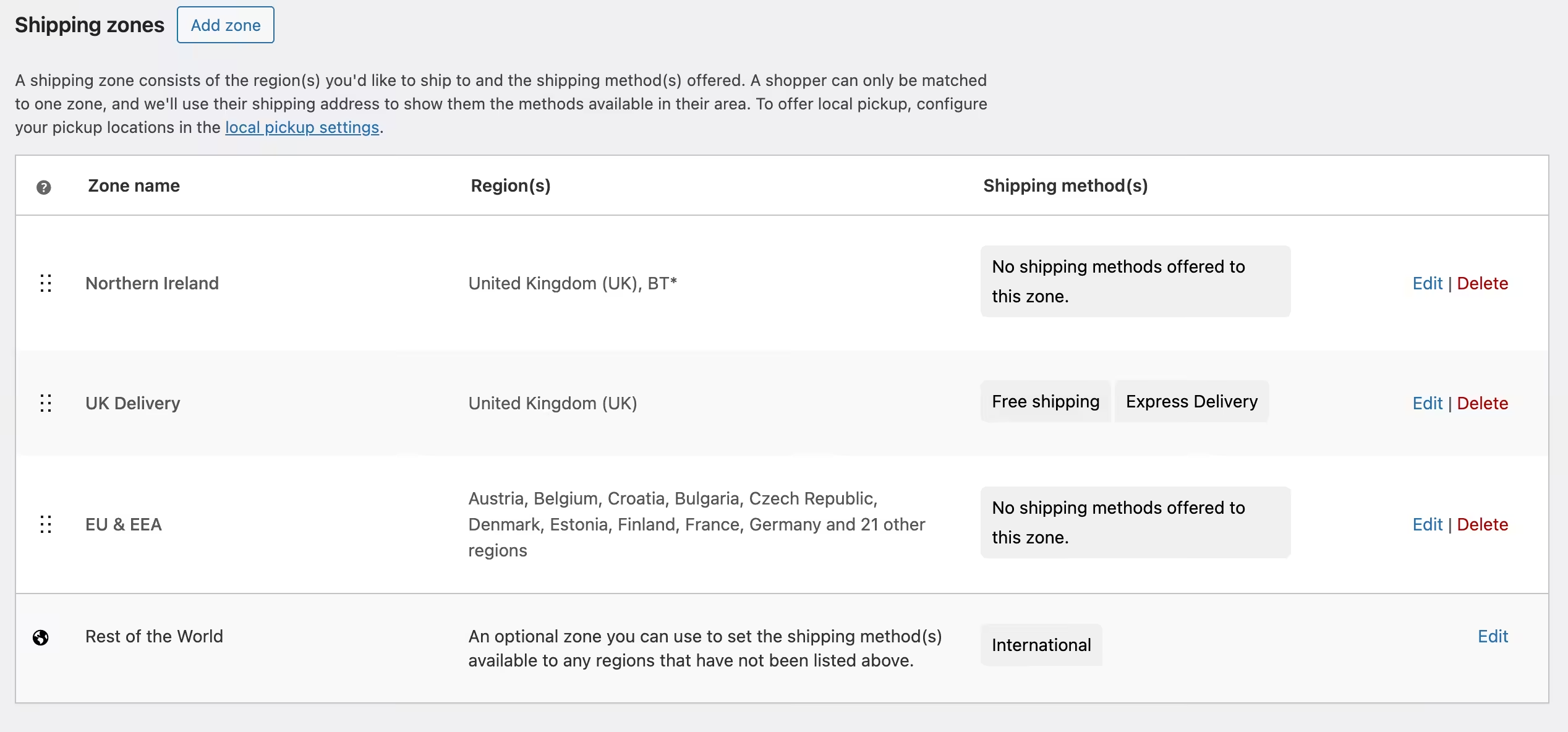
And then using a helpful quirk of WooCommerce, we’re not going to add any shipping options for Northern Ireland or EU & EEA, which means that when customers from these regions attempt to check out, they will see that annoying error message “No shipping options for your area”.
Creating the Northern Ireland shipping zone
The saving grace when setting up the Northern Ireland shipping zone is that every NI postcode starts with BT, so whilst fiddly – this could’ve been oh so much worse.
-
- Log in to your WordPress/WooCommerce website and head to your Dashboard >
- Go to WooCommerce > Settings > Shipping
- Click “Add zone” and create a Shipping Zone called “Northern Ireland”
- Under “Zone regions”, select “United Kingdom”
- Click the little blue link that says “Limit to specific ZIP/postcodes”
- In the new field, add in
BT* - Save changes
Do not add any shipping methods, it’s also VERY important that the code is BT* with no other gubbins or spaces.
Editing your existing UK shipping zone
You probably already have this fella set up with your shipping methods already, so here all we are going to do is head to the ‘Zone regions’ and add in Jersey, Guernsey and Isle of Man. These are not covered by GPSR, so popping the Crown Dependencies in here will allow these customers to continue to ship with you.
If you would like to charge a different amount of shipping for Jersey, Guernsey and the Isle of Man, you should create an additional Shipping Zone for these, rather than adding them into the UK Shipping Zone.
You might have noticed that we haven’t excluded Northern Ireland from this zone, and that’s because we don’t need to, woohoo. With WooCommerce, whichever zone is the closest match to the shopper and is at the top of the Shipping zones list, is the one they are given. We’ll get to that list in a wee mo.
Because that first Northern Ireland zone is closer than our UK zone, anyone with a BT postcode should not be show this UK Shipping Zone.
Creating a non-serviceable Europe shipping zone
Like with Northern Ireland, we now need to create a shipping Zone for the EU & EEA countries, and not give them any shipping methods. We’re going to start by either editing your existing ‘Europe’ zone, or creating a new one by clicking that ‘Add zone’ button again.
This time, under “Zone Regions”, you’re going to add in all of those EU & EEA countries from my previous lists. It is really important. that you DO NOT just select ‘Europe’ unless you also want to block customers in non-EU European countries, and the poor citizens of San Marino, Monaco and Albania would miss out on your wares.
You can then set up your other shipping zones as normal.
Ordering your WooCommerce shipping zones list
Once you are done adding and tweaking your shipping options, head back to the Shipping zones list and use the 6-dot grippers to drag and drop your zones into order from smallest to largest, with Northern Ireland at the top.
This is très important as this order is what ‘blocks’ your NI users from getting a UK shipping method.
Test, test, test, and use refunds as a safety net
After you’ve popped these methods in place, it’s a really good idea to through some rando addresses into your website and make sure you’re seeing the shipping methods (or lack there of) that you would expect.
Personally, I like to throw in addresses for landmarks to test our checkouts, so here’s a few for you:
- Northern Ireland: Giants Causeway, 44 Causeway Road, Bushmills, County Antrim, BT57 8SU
- UK: Diggerland, Langley Park, County Durham, DH7 9TT
- EU: La Cabra, Møntergade 3A, 1116 København K, Denmark – also if you like a fancy coffee and are in Copenhagen, ya gotta check this one out
And finally, if an order does slip in from a country you cannot ship to, just cancel and refund the order. It’s not ideal, but it’s probs a lot better than non-compliance.
Update your website’s delivery information page
This is just GPSR housekeeping, but it’s a very good idea to cap this website change off by updating your delivery page to explain why you are unable to ship to Northern Ireland, the EU and EEA. If you were previously shipping to these regions, you might also need to remove prices and methods that no longer apply.
As our Method 2 is still a wee bit bodgy, we can’t easily edit the ‘No shipping methods for your area’ message, which might result in more customers looking for your delivery/shipping page.
But what about returns and exchanges from EU customers after the 13th December?
I literally have no fluffin’ idea here. This is an area where I can’t find any advice, but if you are unable to fulfil exchanges from previous NI, EU, & EEA customers, I would pop that info on your returns policy page too.
Going to town with pop-ups and notices
If your small business has a significant EU, NI & EEA customer base, it might be worth over-communicating this change. With WordPress & WooCommerce, I would look into geotargeted pop-ups if you already have geotargeting available.
It’s hard to say “everyone needs to add a site warning” because every warning will interrupt your customers, and generally more interruptions = fewer orders = less money = sadder you.
I would add the most subtle information possible – even if that’s just your updated delivery policy page – and then see if you get an uptick in customer service enquiries from these regions.
Here’s some other ways you could add more GPSR info to your website, so you can pick the best ones for your website:
- Top bar banner/announcement bar
- Contact page notice
- Dedicated GPSR policy page in your footer
- GPSR warning pop-up
- Update or add EU delivery toggles/tabs on product pages
Pop 13th December: GPSR in your calendars (and ecommerce reporting)
GPSR will almost certainly impact your website conversion rate as fewer website visitors will be able to place orders.
This might me on your mind right now, but July-2025-You might not remember quite as well, and I don’t want them to be feeling down-in-les-dumps because their conversion rate has dropped below 1.5% percent and they have no idea why.
So as a last note in this epically long article on very boring legislation and WooCommerce how-tos, I just want you to pop your last date for EU, EEA & NI orders into your diary/planner/stats tools.
And that’s it. Usually I sign-off blog posts encouraging readers to DM me if they have any questions about the subject I’ve just covered, but as this is almost beyond the reach of my GPSR knowledge, I have no more to give!
So instead, maybe still check me out on Instagram as @studio.cotton where I share all sorts of helpful website tips, and here’s 3 blogs I love in case you’re new to me & Studio Cotton.